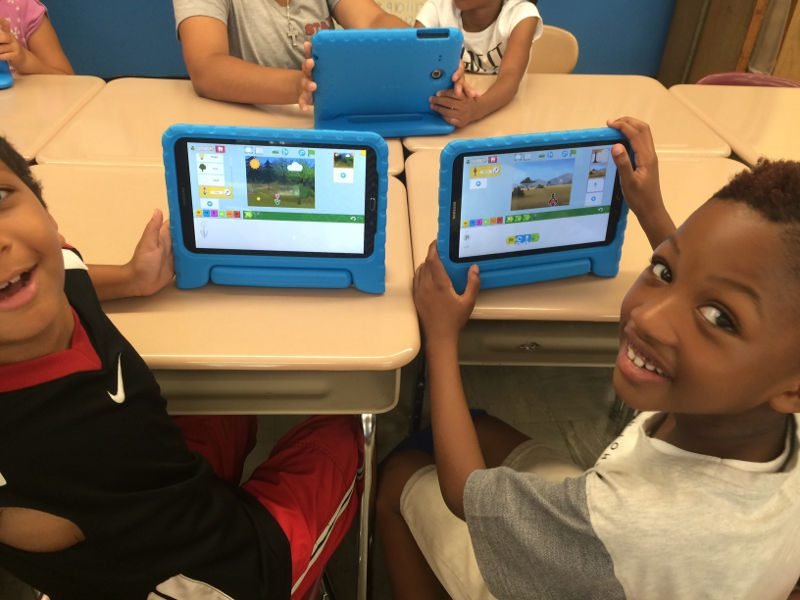
Welcome to the Jr Program in Scratch
The Jr Program in Scratch is an interactive introductory STEM course created by MyCodingClasses.com specifically designed for young minds aged 5 to 8. Powered by ScratchJr—the visual programming platform developed by MIT and Tufts University—this program introduces early learners to foundational computer science, spatial math, and logic through playful digital storytelling and creative animation.
Instead of typing complex code, children snap together visual block commands to make characters move, jump, dance, and interact. By the end of the program, early learners turn abstract thinking into concrete creations while building their very own interactive stories, games, and animations.
STEM Skills Your Child Builds With the Jr Program in Scratch
1. Sequencing, Patterns & Pre-Reading Logic
The Jr Program uses visual block symbols that empower early learners to code before they become fluent readers:
- Arranging code blocks in a strict left-to-right sequence—mirroring early reading flow
- Identifying repeating block patterns to simplify code and automate character actions
- Connecting cause and effect using event-driven triggers like “When Green Flag Clicked” or “When Tapped”
2. Early Math & Spatial Reasoning
Visual block coding turns foundational mathematical concepts into active, hands-on learning:
- Using grid coordinates and counting steps to guide characters across custom backgrounds
- Master directional concepts (up, down, left, right, turn, rotation)
- Exploring scale, size transformations, and geometric movement
3. Algorithmic Thinking & Problem-Solving
Young learners discover how computers process instructions step-by-step:
- Ordering commands logically to achieve specific animation outcomes
- Testing code sequences in real time and adjusting blocks when characters don’t move as planned
- Developing persistence, patience, and analytical thinking through playful debugging
4. Digital Storytelling & Creative Design
Children transition from passive media consumers into active digital creators:
- Designing custom sprites and backgrounds using the built-in paint tools
- Recording original voiceovers and sound effects for character dialogue
- Blending art, music, narrative structure, and technology into unified projects
5. Early Engineering & Computational Workflows
Students follow the creative engineering design process:
- Storyboarding ideas on paper before coding on-screen
- Prototyping interactive scenes and testing multi-character interactions
- Sharing final projects with peers to build early presentation confidence and collaborative habits
Why the Jr Program in Scratch Is Perfect for STEM Learning
- Built for Early Learners (Ages 5–8) — Specifically crafted for pre-readers and early elementary students using intuitive, color-coded blocks.
- Research-Backed Pedagogy — Grounded in MIT Media Lab research on early childhood computational thinking.
- Hands-On & Balanced — Blends playful screen-based creation with offline logic games and creative storytelling.
- Safe & Accessible — Beginner-friendly environment requiring zero prior coding or keyboard typing skills.
- STEM-Aligned Curriculum — Supports early math standards, spatial awareness, and creative design principles.
Powered by MyCodingClasses.com
Our specialized instructors excel in guiding young learners through their very first steps into technology with patience, structured play, and positive encouragement.
Students receive:
- Guided, age-appropriate instruction tailored for early elementary attention spans
- Interactive storytelling and playful game design challenges
- Personalized encouragement that builds early confidence in technology
- A safe, collaborative classroom environment that fosters creative curiosity
ScratchJr + MyCodingClasses.com = the ideal foundation for your child’s lifelong STEM journey.
The Capstone Project: My First Interactive Storybook
By the final session, every student completes and presents a custom Interactive Animated Storybook:
- Custom Characters: Original sprites designed using paint tools and personalized color palettes
- Multi-Scene Narrative: Programmed page transitions that guide viewers through a complete multi-level story
- Voice & Audio Effects: Custom recorded voiceovers and sound triggers for character dialogue
- Interactive Animations: Programmed movements, dances, and loops triggered when characters are tapped on-screen